
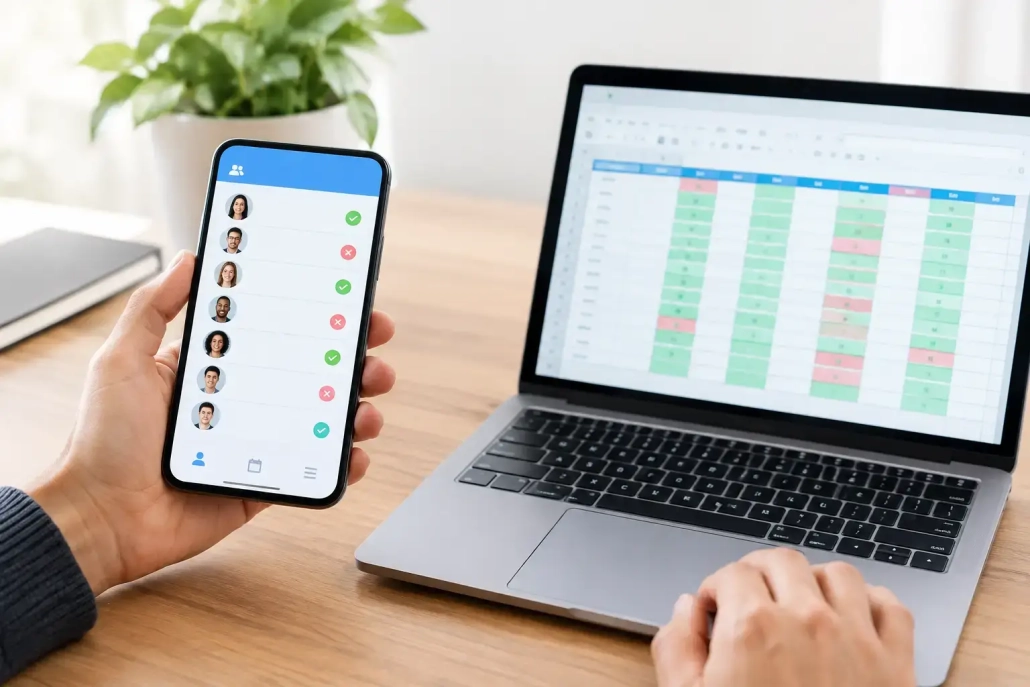
Student Attendance App vs Spreadsheet Compared
A teacher starts first period with 28 students, three late arrivals, a substitute in the building, and a parent calling the front office to ask whether her child made it to class. That is not the moment to search through separate tabs, sort rows, or wait for someone to email a spreadsheet. The student attendance app vs spreadsheet decision is ultimately about whether your school can act on attendance information while it still matters.
Spreadsheets have a place in school operations. They are familiar, low-cost, and useful for one-time analysis. But daily attendance is more than a recordkeeping task. It affects student safety, instructional time, state reporting, family communication, intervention planning, and campus accountability. For schools managing hundreds or thousands of students, the right system needs to support the pace of the school day.
Student Attendance App vs Spreadsheet: The Operational Difference
A spreadsheet stores information. An attendance app helps staff capture, verify, share, and act on information in real time.
With a spreadsheet, attendance data often begins as a paper roster, a teacher-entered file, or an export from another system. Someone must consolidate entries, check for missing fields, identify duplicates, correct formatting errors, and send updates to the people who need them. The process may work for a small program with a limited number of students and a single attendance checkpoint. It becomes fragile when multiple staff members enter data throughout the day.
An attendance app is designed around the actual movement of students and staff. Teachers can scan students into class. Front-office teams can document late arrivals and early dismissals. Deans can see whether a student is in class, at lunch, or assigned to another location. Administrators can review exceptions without waiting for an end-of-day file.
That distinction matters because schools do not manage attendance after the fact. They manage it minute by minute.
Speed Matters When Students Are Moving
A spreadsheet can tell you who was marked absent once the file has been updated. It cannot reliably answer a more urgent question: where is a student right now?
Consider a typical morning. Buses arrive in waves. Students report to breakfast, homeroom, counseling appointments, and classrooms. Staff are handling tardy passes, visitors, phone calls, and discipline referrals. When attendance is logged manually in separate files, every handoff adds time and creates an opportunity for data to fall behind reality.
A mobile or barcode-based attendance app reduces those handoffs. Staff can capture arrival, classroom attendance, and designated check-ins at the point of contact. The office sees updates as they occur, which helps teams follow up on unexcused absences sooner and respond more confidently during a safety event.
For a small school with a stable daily routine, a spreadsheet may be adequate for limited internal tracking. For a campus with multiple entrances, rotating schedules, frequent tardies, or high student mobility, speed becomes a requirement rather than a convenience.
Accuracy Depends on Process, Not Good Intentions
Most spreadsheet errors are not caused by careless staff. They are caused by a process that asks busy people to perform repetitive data entry under time pressure.
A teacher may use a nickname rather than a legal name. A student may appear twice because an identifier was entered differently. A row may be deleted, a filter may hide records, or a staff member may accidentally work from an outdated version. These are common problems, especially when several teams maintain their own files.
Attendance apps improve accuracy by standardizing how records are captured. Student IDs, barcode scans, class rosters, timestamps, attendance codes, and staff permissions can be tied to a consistent workflow. Instead of asking users to create a process every day, the system guides them through one.
That does not mean an app eliminates the need for review. Schools still need clear attendance policies, training, and designated ownership for corrections. The difference is that corrections can be documented, timestamped, and reviewed in context rather than buried in a changed cell.
A single source of truth reduces confusion
When the front office, teachers, attendance staff, and school leaders each use separate spreadsheets, disagreement is almost inevitable. Which file is current? Who changed an absence to excused? Has the parent notification already been sent?
A centralized attendance platform gives authorized staff a shared operational view. This reduces duplicate work and makes it easier to establish accountability for follow-up. It also helps school leaders identify patterns, such as repeated first-period tardies, chronic absence by grade level, or attendance issues tied to a particular schedule.
Reporting Is Where Spreadsheets Start to Strain
Spreadsheets are powerful analysis tools in the hands of an experienced user. A skilled operations team can build formulas, pivot tables, filters, and dashboards. The challenge is maintaining them while the school day continues to generate new records.
Recurring reports often require staff to clean data before it can be trusted. If attendance codes are inconsistent or records live across multiple files, reporting becomes a manual project. That consumes time that attendance teams could spend contacting families or supporting students with emerging attendance concerns.
An attendance app can automate standard reporting workflows and organize data around the questions schools already ask: Who is absent today? Which students have accumulated tardies? Which classrooms have not submitted attendance? Which students need outreach? What documentation is available for district or state reporting?
The value is not simply faster reports. It is more time to make decisions from current information. A principal should not need to wait until Friday to see a pattern that started Monday morning.
Safety and Accountability Need Real-Time Visibility
Attendance is a key part of campus accountability. During an evacuation, lockdown, medical incident, or other emergency, school staff need a dependable way to confirm who is supposed to be present and where they were last documented.
A spreadsheet can serve as a backup roster, but it is limited by how recently it was updated. If a student left class for the nurse, arrived late, checked out early, or moved to an intervention room, the spreadsheet may not reflect that change without multiple manual updates.
An all-in-one student tracking system can connect classroom attendance with student movement workflows, including mobile check-ins, hall pass activity, visitor monitoring, cafeteria activity, and designated screening points. Not every school needs every module. The important question is whether the school can build a clear, usable picture of campus activity without creating more work for staff.
This is especially relevant for large districts, campuses with open layouts, schools with high visitor volume, and buildings where administrators oversee multiple grade levels or programs. In those settings, visibility is not an extra feature. It supports faster, more informed decision-making.
Cost Should Include Staff Time and Missed Follow-Up
A spreadsheet may appear to be the less expensive option because most schools already have spreadsheet software. But the real cost includes the time required to build templates, train users, reconcile records, troubleshoot version conflicts, create reports, and chase down incomplete entries.
There is also the cost of delayed action. If an attendance issue is discovered days later instead of during the first period, the school has lost an opportunity to confirm student safety, communicate with family, or address a barrier to attendance.
An attendance app requires implementation planning, user training, and a budget commitment. For some small or temporary use cases, that investment may not be justified. A single after-school program, a short-term pilot, or a very small school with simple needs may reasonably rely on a well-managed spreadsheet.
For district-wide daily attendance, however, the stronger comparison is not software cost versus free software. It is manual administration versus a scalable system that supports accurate capture, real-time oversight, and repeatable reporting.
What to Look for in an Attendance Platform
The best fit is not necessarily the platform with the longest feature list. It is the one that aligns with your school’s workflow and can grow with your needs. Evaluate whether the system supports quick teacher use, flexible attendance codes, mobile or barcode capture, current student rosters, role-based access, parent communication workflows, and reporting that matches district requirements.
Integration should be part of the conversation early. If staff must enter the same student information into multiple systems, the school is recreating the spreadsheet problem in a new format. A platform that works with the student information system can reduce duplicate entry and keep records aligned across teams.
Implementation support also matters. Schools need a partner that can configure workflows around their bell schedule, arrival process, attendance policies, and staff responsibilities. SwipeK12 Solutions is built around that operational flexibility, helping schools combine attendance capture, student accountability, and campus monitoring in a system staff can use every day.
The right next step is to map your current attendance process from the moment students arrive through end-of-day reporting. Wherever staff are re-entering information, searching for the latest file, or waiting to confirm a student’s status, there is an opportunity to make attendance work harder for your school.

Leave a Reply
Want to join the discussion?Feel free to contribute!