
How to Digitize School Tardy Tracking Well
The first bell is often the busiest five minutes in a school building. Students arrive through multiple doors, buses run late, families need answers, and office staff are expected to know exactly who is present. Learning how to digitize school tardy tracking gives leaders a more reliable way to manage that moment – without adding another manual process for teachers or front-office teams.
A strong digital tardy process does more than replace a paper sign-in sheet. It creates a real-time record of student arrival, applies school-defined rules consistently, alerts the right people, and gives administrators usable data for intervention. The result is better accountability for students, clearer communication with families, and less time spent reconciling attendance records after the fact.
Why paper tardy tracking breaks down
Paper logs, handwritten passes, and verbal check-ins can work in a small building on a quiet morning. They become unreliable when several students arrive at once, a substitute is covering the office, or a family disputes an attendance mark. Staff must interpret handwriting, enter data later, locate documentation, and determine whether a student arrived late because of transportation, an appointment, or an unexcused issue.
The bigger concern is timing. A tardy entered hours later does not help a dean identify a student who is repeatedly missing first period. It does not help a teacher confirm whether a student is legitimately on campus. It also leaves attendance teams with incomplete information when they need to contact families quickly.
Digital tracking closes that gap by recording arrivals at the point of entry and making the information available immediately. Still, the right approach depends on building layout, staffing, bell schedules, and district policy. A single-campus charter school may need a simple barcode station at the main office. A large district may need mobile check-in options, multiple entrances, SIS integration, and centralized reporting.
How to digitize school tardy tracking in five steps
1. Define what counts as tardy before selecting technology
Technology should enforce a clear process, not force a school into an unclear one. Start by documenting the rules staff already use: when the tardy window begins, how students are marked after the window closes, which reasons are excused, and what happens after repeated late arrivals.
Separate operational details from disciplinary decisions. A system should capture that a student arrived at 8:17 a.m. and select or record the stated reason. Whether that tardy triggers a warning, detention, counselor conversation, or transportation review is a policy decision that may vary by grade level or student circumstance.
This is also the time to identify exceptions. Bus delays, weather events, IEP-related accommodations, medical appointments, and late-start schedules should not require staff to override dozens of records individually. Clear rules make automation fairer and reduce inconsistent treatment.
2. Capture arrival data where tardiness happens
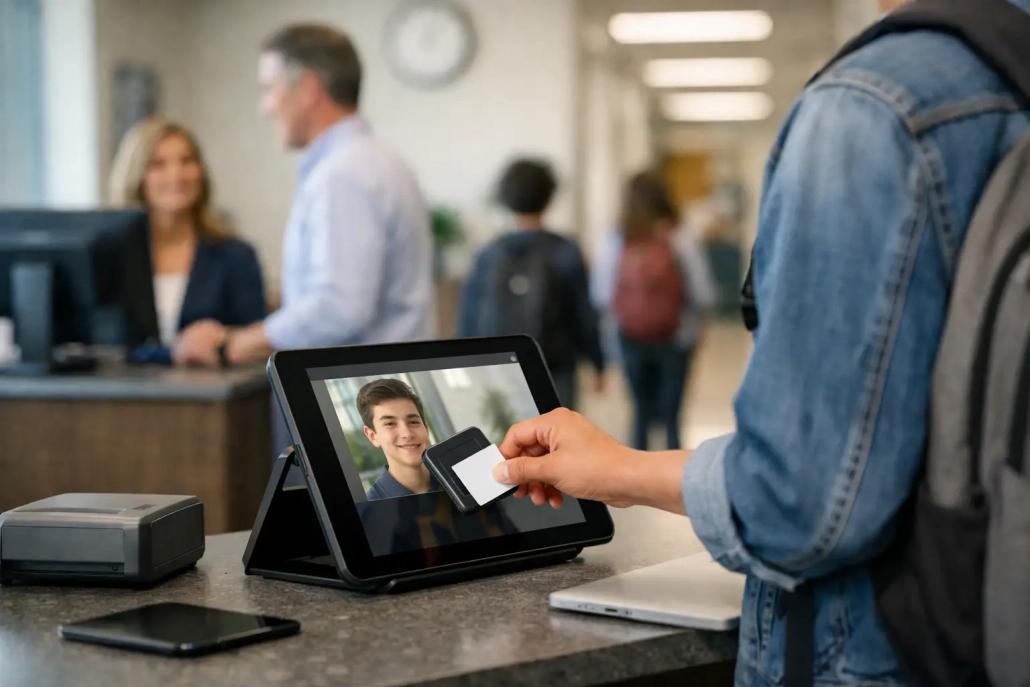
The fastest process is usually the one that requires the fewest handoffs. Students can scan a barcode ID card at a kiosk, use a staffed check-in station, or be checked in through a mobile device by authorized personnel. The best method depends on traffic flow.
For many schools, barcode scanning is a practical starting point. A student scans, the system time-stamps the arrival, and staff can select a reason or confirm the appropriate tardy code. At high-volume entrances, multiple scanning points prevent lines from forming in the office. At smaller buildings, a single device may be enough.
Do not overlook students who forget IDs or arrive with a parent. Staff need a quick student search option and a controlled way to document late arrivals without creating duplicate records. A digital workflow should make the exception process faster, not send staff back to paper.
3. Connect tardy records to the SIS and attendance workflow
A standalone spreadsheet can digitize data entry, but it does not create operational visibility. The real value comes when tardy activity aligns with the student information system, daily attendance codes, schedules, and reporting requirements.
Before implementation, determine which system is the record of truth, how frequently data must sync, and who owns correction workflows. For example, an office team may capture a student’s late arrival in real time, while attendance staff review and finalize official attendance codes according to district policy. Teachers should see accurate status without being asked to reconcile office records manually.
Integration requirements vary. Some schools need near-real-time updates for period attendance and safety accountability. Others may be comfortable with scheduled synchronization. The key is to eliminate duplicate entry and avoid conflicting records across platforms.
4. Automate the response, not just the record
Digitizing the check-in is only the first win. A well-designed tardy workflow can automatically notify families, issue a digital pass, flag repeated patterns, and route students to the correct staff member when action is needed.
A student arriving late should not have to explain the same information to the front office, teacher, and dean. Once the arrival is recorded, the system can provide a time-stamped pass for class while authorized staff see the reason and status. If a school policy requires parent notification after each unexcused tardy, that communication can be triggered consistently rather than depending on someone finding time to make calls.
Automation needs guardrails. Families should receive messages that are accurate, understandable, and aligned with district communication practices. Staff also need the ability to correct an entry when a scan is missed or a transportation delay affects many students. The goal is consistent follow-through, not a rigid system that ignores real school circumstances.
5. Turn tardy data into early intervention
Tardiness is often treated as a discipline issue after it becomes chronic. Digital records allow schools to spot the pattern earlier. A student who is late twice in one week may need a conversation about transportation, morning responsibilities, attendance anxiety, or a class-specific concern. A student who is late only to fourth period may need a different response than one who arrives late to campus every morning.
Review data by student, grade, entry point, period, reason code, and day of week. Look for patterns that point to operational changes as well as student interventions. If a large share of tardies occurs after a specific bus route arrives, the issue may be transportation timing. If one entrance creates a daily bottleneck, adjusting staffing or adding a scanning station may produce an immediate improvement.
District leaders should also monitor data quality. A sudden drop in tardies could mean behavior improved, but it could also mean staff stopped recording late arrivals. Compare digital arrivals, attendance changes, and office activity to confirm the process is being used as intended.
Build a process staff will actually use
The most advanced platform will not improve tardy accountability if staff view it as extra work. Keep the daily workflow simple: scan or search the student, confirm the reason, issue the pass if needed, and let the system handle the downstream record. Train office teams, deans, teachers, and substitutes on the few actions relevant to their roles.
A short pilot is often the best way to test the process. Run it at one entrance, during first-period arrival, or with one grade level. Measure scan time, line length, correction volume, and staff feedback. Then adjust device placement, reason codes, and notification language before expanding building-wide.
It also helps to assign ownership. Attendance teams may own codes and records, school operations may own devices and entry coverage, and IT may own SIS integration and access controls. When responsibilities are explicit, a missed scan or sync issue can be resolved quickly instead of becoming an end-of-month reporting problem.
What to look for in a digital tardy tracking system
Choose a platform based on the realities of your school day. It should support rapid barcode and mobile check-ins, configurable tardy codes, real-time visibility, and reliable SIS-connected reporting. It should also provide role-based access so teachers, office staff, administrators, and district leaders see the information they need without exposing unnecessary student data.
Ask vendors how the system handles high-volume arrival, offline interruptions, duplicate scans, forgotten IDs, schedule changes, and mass transportation delays. Support responsiveness matters as much as features, especially during the first weeks of rollout. A solution should scale from a single school to a district without requiring a completely new workflow.
SwipeK12 supports this all-in-one approach by combining barcode-based attendance capture, real-time student accountability, notifications, and integrated reporting workflows designed for K-12 operations.
Make the first bell a point of control
A digital tardy process gives schools a dependable record at the moment it matters most: when students enter the building. Start with clear rules, place capture tools where arrivals occur, and use the resulting data to address barriers before late arrivals become chronic. When the workflow is fast for staff and visible to leaders, the first bell becomes less of an administrative scramble and more of a reliable point of student accountability.


Leave a Reply
Want to join the discussion?Feel free to contribute!